
Krush AI is built for people who want an AI companion that feels less like a chatbot and more like a character-driven connection—flirty, emotional, and roleplay-ready.
Popular Alternatives:



The niche is crowded, but the winning formula is still rare: characters that feel consistent, scenes that don’t fall apart, and enough customization to make the experience feel personal instead of generic.
Krush AI often shows up under slightly different names across platforms (some listings describe it as “KrushChat” or “AI girlfriend”), but the core promise stays the same: pick or create a companion, chat in a more intimate style, and optionally add extras like voice and images to make it feel more real.
This review breaks down what Krush AI offers, how the experience typically works, what pricing models usually look like in this category, who it’s best for, the most common frustrations, and how to stay safe while using it.
Overview
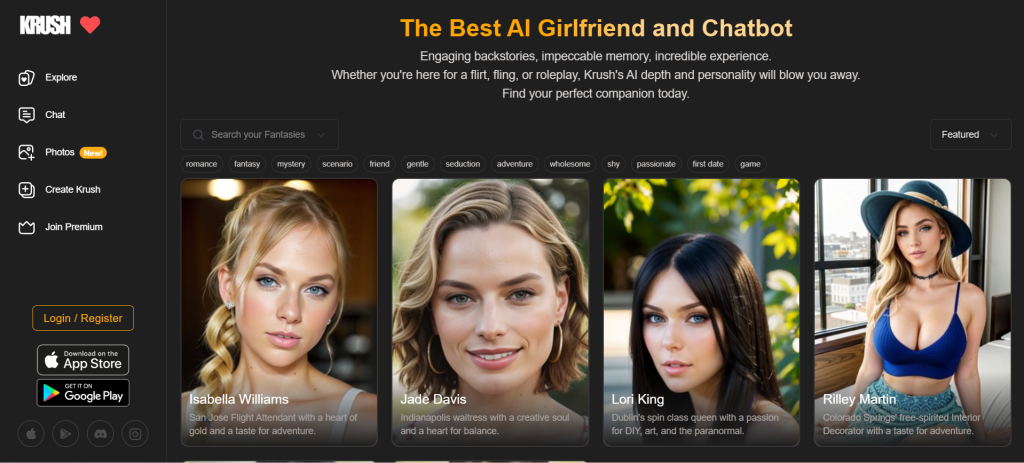
Krush AI is an AI companion and roleplay chat platform designed around “characters” rather than assistant-style Q&A. Users typically:
- choose a ready-made character (with a backstory and vibe), or
- create a custom companion (appearance, personality style, tone), then
- chat in a format that’s meant to feel personal, romantic, or story-driven.
Where many companion apps fail is continuity. They start exciting, then turn into repetitive compliments or random tone shifts. Krush AI’s positioning leans toward deeper immersion: more character personality, stronger relationship flow, and optional features that push the experience beyond plain text.
The best way to think about Krush AI is simple: it’s entertainment and companionship, not productivity. It’s for scenes, banter, flirting, emotional check-ins, and fantasy roleplay—depending on the user’s comfort level and boundaries.
Features
Krush AI lives or dies on how well it supports immersion. Features matter, but the experience matters more. Here’s what users typically care about most.
1) Character discovery and personality variety
A strong character platform needs variety that actually feels different. Krush AI typically centers the experience around multiple character types and themes, so users can switch vibes quickly:
- sweet and supportive companion
- playful crush energy
- confident, teasing personalities
- scenario-based roleplay characters (fantasy, mystery, romance arcs)
Actionable takeaway: The best results usually come from characters with a clear hook:
- who they are
- how they talk
- what the scenario is
Vague characters often create vague conversations.
2) Immersive roleplay and scene-first chat
Krush AI is designed to support roleplay. That’s not just “talking flirtatiously.” It’s scenes with a setting and momentum.
A roleplay chat stays engaging when the user provides:
- setting: where the scene takes place
- tone: romantic, playful, slow-burn, wholesome, spicy, etc.
- pacing: short replies vs descriptive storytelling
- boundaries: what’s allowed and what’s not
Actionable takeaway: A simple “scene anchor” message improves quality instantly:
- “Keep it realistic and slow-burn. Stay in scene. Ask one question per reply. Avoid repeating compliments.”
That one instruction reduces loops and makes the companion feel more intentional.
3) Customization and “build your ideal companion”
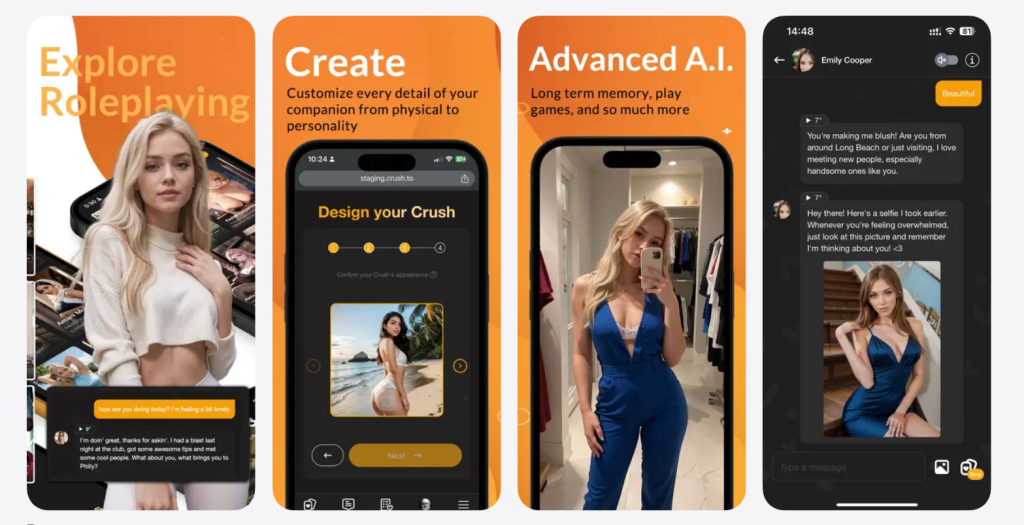
Krush AI is commonly framed as customizable—meaning users can shape the experience more than a typical chatbot. Depending on the version and plan, customization may include:
- choosing personality traits or “vibe”
- adjusting how affectionate or playful the chat should be
- selecting voice options (where supported)
- shaping appearance or character style (where supported)
Actionable takeaway: The most powerful customization isn’t appearance—it’s behavior rules. One simple rule-set can transform the experience:
- “Stay in character. Keep replies under 6 lines. No repeated pet names. Ask questions that move the scene forward.”
4) Voice chat for more realism (where available)
Some Krush AI experiences include voice chat or voice-style interaction. Voice can be a game-changer when it’s responsive and consistent with the character.
Voice feels worth it when:
- it matches the personality vibe
- it’s stable (not glitchy or delayed)
- it supports real conversation pacing, not just novelty
Actionable takeaway: Users who want voice to feel less awkward should guide the style:
- “Speak slower. Short sentences. Light teasing. Ask one question per reply.”
It prevents the voice interaction from feeling like a robotic monologue.
5) Images and “pics” for immersion (where supported)
Many AI companion apps now include image generation or “selfie-style” content. Krush AI has been presented as supporting image generation in some environments.
Images can add immersion when used sparingly:
- a “selfie” to match the scene
- a visual of the outfit or mood
- a moment snapshot that supports the story
Actionable takeaway: The best image prompts are direct and specific:
- “Casual indoor selfie, warm lighting, cozy vibe, soft smile, modern outfit, realistic style.”
Short prompts often produce generic results.
6) Memory and continuity
Krush AI’s experience is often described as relationship-driven, which naturally implies memory. In real use, AI memory is usually:
- strongest in the short-to-medium term
- inconsistent across long story arcs
- better when users re-anchor key facts
Actionable takeaway: Every 10–15 messages, drop a one-line recap:
- “Still at the café, slow-burn romance, playful teasing, realistic tone.”
It keeps the character from drifting.
Pricing
Krush AI typically follows the standard structure for AI companion platforms:
- Free to start (enough to test the vibe)
- Premium tiers (higher limits, faster access, and/or premium features like voice/images)
Exact prices can change, and different app-store versions can have different plans. What matters more is how pricing affects the experience.
What users should look for
- Does the free tier feel usable or constantly blocked?
- Does premium unlock quality, or just remove friction?
- Are premium features clearly explained before purchase?
- Is it easy to cancel?
A low-risk “should this be paid for?” test
Before paying, users should run a quick reality check:
- Chat with 3 different characters for variety
- Run one scene for 15–25 exchanges (roleplay stress test)
- Change the scene mid-chat and see if it stays coherent
- Test whether the character adapts to instructions (short replies, less repetition)
If Krush AI feels fun and coherent in that test, premium may enhance it. If it already feels repetitive, paying rarely fixes the foundation.
User Base
Krush AI usually attracts adults looking for a companion-style experience that can be romantic, flirty, or roleplay-driven.
Krush AI is usually best for:
- adults who enjoy character chat and relationship-style conversation
- users who like roleplay scenes and storytelling
- people who want a private, low-pressure companion vibe
- users who enjoy customization and switching personalities
- anyone who wants entertainment plus emotional warmth
Krush AI may not be ideal for:
- users who want strictly SFW-only conversation
- people expecting perfect long-term memory with zero drift
- users who dislike subscriptions or paywalls
- anyone prone to oversharing personal details
- people looking for a productivity assistant rather than a companion
Advantages
1) Strong companion framing
Krush AI is built to feel like a relationship-style chat, not a generic assistant. That framing often makes the conversation feel more emotionally engaging.
2) Roleplay-friendly design
For users who like scenes and character storytelling, Krush AI tends to be more satisfying than assistant-first chat apps.
3) Customization can create a better fit
When users can shape personality, tone, and interaction style, the experience becomes less random and more personal.
4) Voice and images can add immersion
Where available, voice and image features can turn a basic chat into something more “present,” especially for users who like multi-sensory immersion.
Disadvantages
1) Repetition can still show up
Even strong companion apps can fall into loops—especially in romantic chat where the AI leans on safe compliments.
Fix: Give direct rules:
- “No repeating compliments. Ask one question each reply. Keep it realistic. Keep replies under 6 lines.”
2) Memory drift in longer arcs
Long stories can get messy. Characters may forget details or contradict earlier messages.
Fix: Re-anchor the scene with short recaps and keep the “canon” simple.
3) Quality varies by character
Some characters feel well-designed. Others feel generic. That can be frustrating if discovery tools don’t surface the best ones quickly.
Fix: Start with characters that have detailed intros and clear scenario hooks.
4) Paywalls can change the experience
If premium features include voice, faster access, or higher limits, free users may feel restricted during peak times.
Fix: Treat free as a test. Only upgrade after Krush AI proves it can stay coherent and fun.
Safety
Krush AI can be used responsibly, but companion platforms require stronger privacy boundaries than typical apps.
1) Keep identity out of the chat
Users should avoid sharing:
- full legal name
- address or precise location
- phone number
- workplace details
- personal social accounts
- passwords or financial information
If it feels too personal, it shouldn’t be typed.
2) Use a dedicated email and strong password
A separate email reduces exposure and keeps accounts compartmentalized. It’s a simple step with high payoff.
3) Keep scenarios fictional
A safe rule: keep roleplay fictional and avoid involving real people (coworkers, classmates, identifiable public figures).
4) Watch emotional dependence
Companion chat can feel deeply validating. That’s the point. But if it starts replacing real-world connection or becomes a coping crutch, it’s time to step back.
A healthier rhythm looks like:
- time limits
- avoiding late-night “spiral chats”
- treating the app as entertainment, not emotional survival
5) Control spending
If premium tiers exist, set a monthly cap. Don’t upgrade mid-chat because of excitement or curiosity.
Alternatives
Krush AI sits in a competitive space. The best alternative depends on what a user values most.
1) For stronger long-term companion vibes
Some companion-first platforms focus heavily on continuity, daily check-ins, and emotional flow.
2) For bigger character libraries
Some character-first platforms offer massive community libraries with strong browsing and tagging.
3) For deeper roleplay control
Some tools offer stricter character rules, longer scene stability, and more advanced customization.
4) For image-first experiences
If visuals matter more than chat quality, image-heavy companion tools can feel more satisfying.
Quick decision rule:
If the priority is relationship-style chat with optional voice/images, Krush AI fits the lane. If the priority is huge character variety or ultra-deep customization, other platforms may suit better.
FAQ
1) What is Krush AI?
Krush AI is an AI companion and character chat platform designed for relationship-style conversation and roleplay.
2) Is Krush AI an AI girlfriend app?
Yes, Krush AI is commonly used as an AI girlfriend or AI companion experience, depending on how the character is set up.
3) Is Krush AI free to use?
Krush AI typically offers free access to start, with premium tiers that unlock higher limits or premium features.
4) Does Krush AI support roleplay?
Yes. Roleplay and scene-based chat are central to the experience.
5) Does Krush AI have voice chat?
Some versions and plans include voice chat or voice interaction features. Availability can depend on device and plan.
6) Can Krush AI generate images?
Some Krush AI experiences include image generation or “pics” features to add immersion, depending on the plan and version.
7) Does Krush AI remember past conversations?
Krush AI can feel more continuous than basic chatbots, but memory can still drift. Re-anchoring key details helps.
8) Why do AI companion chats get repetitive?
Repetition happens when the chat lacks structure. Without a scene, the AI falls back on safe romantic patterns.
9) How can users get better conversations on Krush AI?
Set a scene, define tone, add boundaries, and give behavior rules like “ask one question per reply” and “no repetition.”
10) Is Krush AI safe to use?
It can be safer when used responsibly: avoid personal identifiers, use strong account security, and keep scenarios fictional.
11) Should users share personal photos or private details?
No. It’s safer to keep identity and sensitive information out of companion chats.
12) Who is Krush AI best for?
Adults who enjoy romance-style chat, roleplay scenarios, and companion vibes with customization options.
13) Who should avoid Krush AI?
Anyone under 18, people uncomfortable with romantic/adult chat spaces, and users prone to oversharing or dependence.
14) Is premium worth it on Krush AI?
Premium is worth considering only if the free experience already feels coherent and enjoyable. Premium should enhance, not rescue.
15) What are good alternatives to Krush AI?
The best alternatives depend on whether the user wants stronger continuity, a larger character library, deeper customization, or more visual features.
Final Verdict
Krush AI is a solid pick for adults who want an AI companion experience that leans into character, romance, and roleplay rather than generic chatbot conversation. It’s at its best when the user treats it like interactive storytelling: set the scene, define boundaries, guide the tone, and keep the momentum moving forward.
The trade-offs are typical for this niche—repetition can creep in, long arcs can drift, and premium tiers may be needed for the smoothest experience. Used with smart privacy habits and clear limits, Krush AI can be an engaging AI girlfriend-style platform that stays fun beyond the first impression.