
Jogg AI is an AI avatar video generator that turns scripts, prompts, or existing content into talking presenter-style videos. It is built for creators, marketers, and anyone who wants a realistic “digital presenter” without filming, not for people seeking an AI girlfriend or AI boyfriend chat relationship.
Even though it often shows up in “virtual companion” conversations, the core experience is different: Jogg AI focuses on output (videos), not bonding (ongoing emotional chat). That distinction matters, because it changes what “good” looks like—realism, voice quality, and speed become more important than memory, flirtation, or romantic depth.
Last Updated: February 2026
How This Jogg AI Review Was Evaluated:
- AI personality realism
- Memory & learning capability
- Customization depth
- Visual generation (if applicable)
- NSFW boundaries
- Pricing transparency
- Mobile experience
- Subscription fairness
What Is Jogg AI?
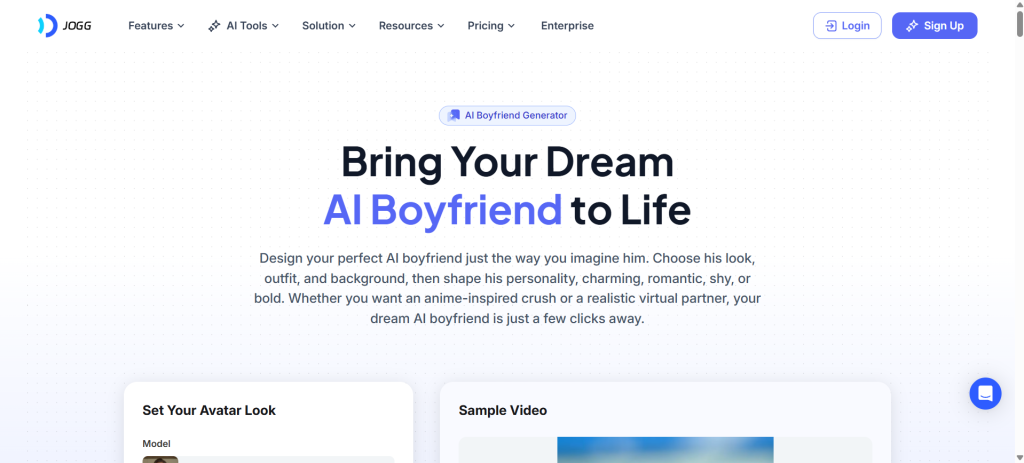
Jogg AI is an AI avatar video platform that generates spokesperson-style videos using lifelike avatars, voice options, and scripted text (or repurposed content). It sits closer to tools like “AI presenter,” “talking photo,” and “text-to-video” than to companionship apps.
It can look like a virtual partner if someone creates a character and writes romantic scripts, but it is not an AI girlfriend app in the classic sense. There is no primary “relationship chat loop” designed to build emotional continuity through daily conversations.
What it is:
- A talking-avatar video generator
- A fast way to produce short presenter clips, explainers, and social videos
- A “digital twin” style tool (depending on plan/features)
What it is not:
- A dedicated AI dating platform
- A long-term emotional companion designed around memory-first conversation
- A romance-first app that prioritizes intimacy, texting realism, and relationship progression
How Jogg AI Works
The workflow is straightforward and designed around producing videos quickly:
- Sign-up
- Create an account in the web app (and in some cases use a mobile app where available).
- Choose the video type
- Common routes include avatar video, talking photo, URL-to-video, or text-to-video.
- Pick an avatar
- Select from a library of avatars, or use a custom avatar option if available on the plan.
- Write or import the script
- Paste text, generate a script, or repurpose content depending on the tool being used.
- Select voice and language
- Choose a voice style and language option to match tone and audience.
- Adjust visuals
- Add basic structure like scenes, layout, and (where available) branding elements.
- Generate
- The platform renders the video. Processing speed varies by plan.
- Export
- Free exports may include a watermark; paid plans typically remove it.
Key Features and Standout Tools
Jogg AI’s strengths live in avatar realism, voice variety, and production speed—especially for repeatable content formats.
Fast avatar video creation: script in, presenter video out—no filming required.
Talking photo mode: make a still image speak with lip-sync and facial motion.
Multiple creation paths: text-to-video, image-to-video, and repurposing workflows for different content types.
Feature highlights that matter most:
- Avatar library + custom avatar options for consistent on-brand presenters
- Voice selection and multi-language support for global audiences
- Video translation and repurposing tools to scale content output
- Template-style workflows that reduce editing friction
- Brand-forward options (more common on higher plans) for creators and teams
- Short-form friendly production for social clips, hooks, and ads
Roleplay and “virtual dating content” angle (important for your site’s audience):
- It can generate video-based “AI boyfriend / AI girlfriend” character content for storytelling.
- It does not replace a dedicated companion chat app, because the experience is not conversational-first.
Is Jogg AI NSFW or Safe for Work?
Jogg AI is primarily positioned as a general-purpose avatar video creation tool, which usually means “safe-for-work by default” in both design and typical use cases (marketing videos, explainers, training clips, social content).
Where NSFW gets complicated:
- The output depends on what script is entered and what content is uploaded.
- Most mainstream avatar-video tools enforce restrictions around explicit sexual content, especially when realistic human avatars are involved.
Practical expectation:
- Mild romance scripts and flirtatious storytelling may be feasible.
- Explicit sexual content, pornographic outputs, or highly graphic material is likely to be restricted, blocked, or moderated in some form.
So the honest read: it’s not an “NSFW companion platform.” It’s safer to think of it as a creator tool that can be used for romance-themed content—within boundaries.
Emotional Realism and AI Intelligence
This is where the category mismatch becomes obvious.
Jogg AI does not aim to feel like a human partner in a chat thread. It aims to look and sound like a believable presenter in a video. So “emotional realism” is more about:
- Lip-sync accuracy
- Facial animation
- Voice naturalness
- Consistency of the avatar character across videos
On memory and learning:
- There is no classic “relationship memory” in the way companion apps handle it.
- Any continuity comes from the creator reusing the same avatar, script style, and recurring story beats.
Is it scripted or dynamic?
- The output is fundamentally scripted. The creator controls the narrative.
- That can be a benefit for people who want control, but it’s not a substitute for a dynamic companion.
If the goal is an emotionally intelligent partner that remembers conversations and adapts over time, a dedicated companion platform will outperform this category. A strong internal alternative for that specific need is Kindroid, because it’s designed around conversation depth rather than video production.
Pricing, Credits & Subscription Model
Jogg AI uses plan-based access with credits and feature tiers, which is typical for AI video platforms.
Common structure to expect:
- Free plan with limited credits, short video limits, and watermark exports
- Entry paid plan that expands video length, removes watermark, and increases credits
- Creator plan that unlocks higher limits and more customization
- Team plan with multi-user features and per-seat pricing
- Enterprise for custom requirements
Typical plan details (as presented on the platform’s pricing layout at the time of evaluation):
- Free: limited credits, short videos, watermark exports
- Starter: higher credit allocation, longer videos, more custom avatars, watermark removal
- Creator: higher limits, more custom avatars, longer duration, more creator tools
- Team: per-seat model with collaboration features
- Enterprise: custom pricing and features
What matters for buyers:
- Credit burn rate: how fast credits drop when generating longer videos or using premium avatar features
- Watermark removal: often the “real” upgrade trigger
- Custom avatar count: crucial for character continuity
- Video duration: short-form creators vs long explainers have totally different needs
Subscription fairness (quick reality check):
- Creator-focused plans can feel expensive if the credit allocation doesn’t match output needs.
- For casual users, the free tier is usually more of a demo than a long-term solution.
User Experience (Mobile & Desktop)
Jogg AI is built around a web workflow that prioritizes speed: pick a template/tool, paste script, choose avatar/voice, generate.
Desktop / web strengths:
- Faster navigation and easier editing
- Better for batch creation
- More comfortable for longer scripts and multi-scene videos
Mobile experience:
- Mobile can be useful for quick creation, testing, or short videos.
- For heavy production, desktop is typically the better experience.
Performance expectations:
- Rendering time varies based on plan and demand.
- Premium tiers usually promise faster processing and smoother output cadence.
Onboarding:
- It’s generally approachable because the “happy path” is simple.
- The learning curve shows up when trying to maximize realism, consistency, and branding across many videos.
Pros and Cons
Pros:
- Strong fit for talking-avatar videos without filming
- Multiple creation paths (avatar video, talking photo, repurposing tools)
- Good for consistent character/presenter content when reusing avatars
- Helpful for social media clips, ads, and explainers
- Paid tiers typically improve speed and remove watermarks
Cons:
- Not a true AI girlfriend/AI boyfriend chat experience
- Emotional “relationship realism” depends entirely on the creator’s scripting
- Credits and tiers can feel restrictive for high-volume creators
- Avatar realism can vary depending on choices and settings
- Not ideal for users who want deep memory-based conversation
Jogg AI vs Alternatives
For avatar video generation, the most relevant comparisons are in the AI presenter category. These alternatives often compete on avatar realism, template quality, brand tools, and workflow speed:
- HeyGen: strong for marketing-style presenter videos and templates
- Synthesia: enterprise-leaning, training and corporate content focus
- D-ID: well-known for talking photo and avatar-style outputs
- VEED: broader video editing suite with AI additions
- Runway: more creative AI video generation features, less “presenter-first”
- Pictory: strong for turning long-form content into short-form video formats
For readers who arrived expecting a relationship companion:
- A dedicated companion app will fit better than any avatar-video generator for daily chat, emotional progression, and memory-based intimacy. Kindroid is a strong internal alternative to mention for that intent.
Comparison Table
| Platform | Best For | Free Version | NSFW Allowed | Visual AI | Key Strength |
|---|---|---|---|---|---|
| Jogg AI | Talking-avatar videos fast | Yes (limited) | Limited / restricted | Yes | Quick presenter-style clips |
| HeyGen | Marketing + social presenter videos | Limited | Limited / restricted | Yes | Strong templates + polish |
| Synthesia | Training + corporate videos | Limited | Limited / restricted | Yes | Enterprise-friendly workflow |
| D-ID | Talking photo style videos | Limited | Limited / restricted | Yes | Simple photo-to-speaking flow |
| VEED | Editing + AI tools in one place | Limited | Depends on policies | Yes | All-in-one editing suite |
| Runway | Creative AI video generation | Limited | Depends on policies | Yes | Creative video generation options |
Who Is Jogg AI Best For?
- Fantasy seekers (video-based): People who want to create character-driven “AI partner” clips for storytelling rather than chat-based companionship.
- Roleplay fans: Writers and creators who prefer control and want to produce scripted scenes.
- Casual flirting (content creation): Users building playful, romantic character content for social media.
- Emotional companionship seekers: Not the best fit for direct companionship needs—this is a video tool, not a relationship-first chat platform.
- Lonely users looking for daily conversation: Better served by a true companion app designed for chat, memory, and relationship progression.
FAQs
Is Jogg AI free?
Yes, there is typically a free tier, but it is mainly designed for testing the platform. Expect tight limits, short durations, and watermark exports.
Does it send real photos?
No. Outputs are generated or animated media based on avatars and inputs. It can create “talking photo” style results, but that is not the same as receiving real photos from a real person.
Can it replace real dating?
No. It does not function like real dating and it is not built to match people. It can produce romance-themed content, but it’s scripted and creator-controlled.
Is it anonymous?
It generally behaves like a standard online tool where an account is created and content is generated. Anonymity depends on what personal information is shared and what is uploaded.
Does it remember conversations?
Not in the way AI companion platforms do. Continuity comes from reusing the same avatar, voice, and writing style—not from a relationship memory system.
Can users customize personality?
Personality is expressed through scripts, voice choice, and avatar style rather than a deep personality engine. It’s more “directed output” than “living character.”
Is it worth paying for?
It can be worth paying for creators who need watermark removal, longer videos, faster processing, and more custom avatars. Casual users often find the free tier too limited for serious output.
Is it better than Replika?
It’s a different product category. Replika is conversation-first companionship; this is video-first creation. Comparing them only makes sense if the goal is scripted avatar videos.
Is it available worldwide?
Web tools are typically accessible in many regions, but app availability can vary by platform and country. The safest approach is to rely on the web app if mobile availability changes.
Is it safe?
It’s as safe as the user’s habits. Uploading personal images or sensitive content always carries risk. It’s best to avoid uploading anything that would be damaging if exposed.
Does it work on mobile?
Mobile access may exist through a dedicated app or mobile web usage, but heavy creation is usually smoother on desktop due to editing comfort and workflow speed.
Can users delete their data?
Most platforms provide account controls and deletion paths, but the exact process varies. It’s best practice to review account settings and privacy options before uploading personal media.
Does it allow NSFW content?
It is not positioned as an NSFW-first platform. Romance scripts may be possible, but explicit sexual content is typically restricted on mainstream avatar-video tools.
Can it be used to create an “AI boyfriend” or “AI girlfriend” video character?
Yes, as a scripted character concept. It can produce clips that look like a virtual partner, but it won’t behave like a chat companion that builds a relationship over time.
What is the best alternative if the goal is a real companion chat?
A conversation-first companion platform is a better match for that intent. Kindroid is a strong option when the priority is ongoing chat realism and memory rather than video output.
Final Verdict on Jogg AI
Jogg AI is a solid choice for people who want fast, realistic talking-avatar videos and a repeatable workflow for content creation. It is not a true AI girlfriend or AI boyfriend relationship platform, so anyone seeking daily conversation, emotional progression, and memory-led companionship should look elsewhere—Kindroid is the better direction for that specific need. For creators who want presenter-style clips, scripted character scenes, or scalable video output, Jogg AI earns a practical recommendation based on speed, variety of tools, and creator-focused plans.