

Chatingly is a reminder that random video chat is equal parts exciting and unpredictable—one click can lead to a real conversation or a fast exit.
Popular Alternatives:



It’s commonly positioned as a simple way to start one-on-one video chats with strangers with minimal setup, focusing on speed, spontaneity, and quick matching.
Last Updated: January 2026
How This Chatingly Review Was Evaluated
This page was evaluated using practical criteria that matter in real-world use:
- Moderation strength: How quickly harmful behavior is handled and how easy it is to report.
- Privacy/anonymity controls: Whether personal details are required and how much control exists over exposure.
- Pricing transparency: How clearly costs, renewals, and paywalls are presented before payment.
- Ease of use (mobile/desktop): How fast it loads, how stable calls are, and how simple it is to start/stop chats.
- Bot/spam prevention: Whether the experience feels human or flooded with fake users and spammy prompts.
- Filtering options: Whether basic preferences (like region or matching style) exist and how locked-down they are.
- Overall user safety: How risky it feels for a first-time user and how easy it is to stay in control.
What Is Chatingly?
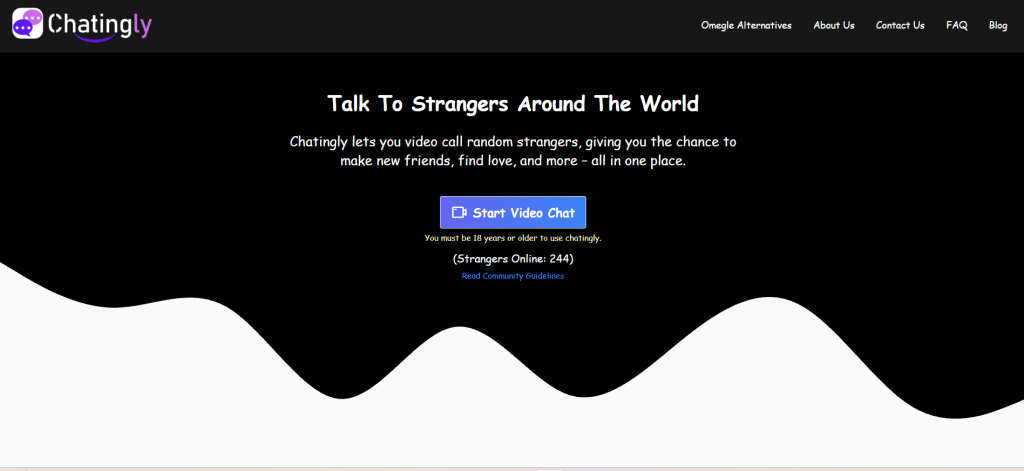
Chatingly is typically described as a random video chat platform that connects users with strangers for one-on-one video conversations. The main idea is simple: open the site, allow camera/mic access if desired, and get matched quickly.
It is not the same as a traditional social network. There usually aren’t deep profiles, long bios, or friend lists as the core product. Instead, the focus is on instant interactions—the kind that can be fun, awkward, hilarious, or over in ten seconds.
Quick take: Random video chat works best when expectations are realistic. The goal isn’t “finding the perfect person.” The goal is meeting someone interesting, then moving on when the vibe is wrong.
How the Platform Works
Most 1v1 cam chat platforms follow the same flow, and this one generally fits that pattern:
- Open the site or page on mobile or desktop.
- Choose video or text mode (if text is offered).
- Grant permissions for camera/microphone (video mode).
- Start matching with a stranger.
- Continue or skip based on the conversation quality.
The “skip” button is a major feature in this niche. It’s the escape hatch that keeps the experience moving. The best platforms make skipping instant, because slow exits create frustration and more risk.
A good approach is to treat it like browsing: quick checks, quick decisions, and no pressure to stay if something feels off.
Key Features and Standout Tools
Even when a platform looks “simple,” several features can make or break the experience.
Fast matching
Speed matters. If users wait too long, they leave. Platforms that keep matching fast tend to retain more real users.
One-on-one format
One-to-one video chat is more personal than group rooms. It also means boundaries matter more because there is nowhere to “blend in.”
Skip/next controls
A responsive next button is essential. It’s not rude in this niche—it’s normal behavior.
Basic reporting
Most platforms offer a report tool. The real question is whether reports feel meaningful, or purely cosmetic.
Device flexibility
Many users want mobile convenience, while others prefer desktop stability. The smoother the cross-device experience, the better.
Optional filters (if available)
Some platforms introduce filters like region or matching preferences. These can improve relevance, but they’re often limited or placed behind paywalls.
Quick take: The “best” feature isn’t a fancy filter. It’s control—easy exits, easy reporting, and settings that reduce unwanted surprises.
Is It Anonymous?
Anonymity in random video chat is more complicated than people think.
On many platforms, users can start without sharing a real name, and that feels anonymous. But video itself is identity. Faces, voices, backgrounds, accents, clothing, and even room details can reveal more than expected.
Practical anonymity usually means:
- No required full name or social login for basic access
- No public profile that gets indexed or searched
- Clear controls to stop, skip, or block
- Minimal pressure to share contact details
But it does not mean invisibility. Anyone on the other side can record their screen, take screenshots, or remember what they saw.
The safest mindset is: assume anything shown on camera could be saved. Then choose what to show accordingly.
Safety, Moderation, and Privacy Controls
This niche is fun, but it’s also one of the highest-risk categories of social interaction online. The safest platforms build friction against bad behavior. The weakest ones rely on users to “just deal with it.”
Here’s what strong safety tends to look like:
Visible reporting tools
Reporting should be easy to find during the chat, not hidden in a menu.
Clear rules
Even a short set of rules helps. Platforms that publish expectations tend to attract slightly better behavior.
Moderation presence
The best experiences feel like someone is actually enforcing standards. The worst experiences feel like anything goes.
User controls
Useful controls include:
- ending chats instantly
- blocking repeat encounters (when possible)
- muting audio quickly
- turning off camera instantly
Privacy habits that matter
Even when a platform offers controls, user behavior is still the strongest safety layer:
- Avoid showing house numbers, IDs, work uniforms, or school branding
- Keep the background simple
- Don’t reveal location in conversation
- Use a separate email for sign-ups if any account is required
Quick take: Safety isn’t only about “moderation.” It’s also about how quickly a user can regain control—end the chat, report, and move on.
Pricing, Payments, and Subscription Structure
Chatingly’s niche often uses a familiar model: free entry + optional paid upgrades.
Common paid mechanics in this category include:
- Premium matching (more “relevant” or faster matches)
- Filters (region, preference-based matching)
- Reduced interruptions (fewer prompts, fewer paywalls, smoother flow)
- Priority access during high traffic
The most important pricing questions for any user are:
- Is the free version genuinely usable, or just a teaser?
- Are costs shown before payment in a clear way?
- Are subscriptions easy to cancel, or buried behind steps?
- Are there “credits” or “coins,” and do they disappear over time?
A responsible approach is to treat paid upgrades as optional convenience—not as a guarantee of better conversations. Filters can improve experience, but they don’t eliminate randomness. They simply shape it.
User Experience: Mobile, Desktop, Sign-Up
Random video chat lives or dies on user experience. A platform can have great marketing, but if the first 30 seconds feel clunky, it loses people.
Mobile experience
Mobile can be convenient, but it also increases accidental oversharing. Phones move around, backgrounds reveal more, and users often don’t notice what the camera is capturing.
Mobile-friendly platforms should feel:
- quick to load
- stable on average connections
- easy to end chats fast
- clear about permissions
Desktop experience
Desktop tends to be:
- more stable
- easier to manage tabs/settings
- better for users who want a controlled environment
Sign-up expectations
Many platforms in this niche advertise “no sign-up,” but still add optional login for premium features. If sign-up is requested, users should expect:
- basic email/password flows
- prompts to verify age
- payment gates for filters or premium matching
A strong platform makes it clear what is required and what is optional.
Pros and Cons
Pros
- Fast way to meet strangers through cam chat
- One-on-one conversations feel more personal than group rooms
- The “next” culture makes it easy to leave awkward chats
- Works well for quick, low-commitment interaction
Cons
- “Anonymous” can be misunderstood—video reveals identity cues
- Quality can vary wildly depending on time and traffic
- Bot/spam risk exists in the niche overall
- Safety depends heavily on moderation and user habits
Chatingly vs Alternatives
No single platform wins for everyone. The best choice depends on what the user actually wants: quick randomness, better moderation, stronger filters, or a calmer environment.
Below are solid alternatives often compared in the random video chat space, each with a slightly different feel:
OmeTV
Often chosen for fast matching and broad user volume. It can feel busy, which is either a plus or a headache.
Chatroulette
A classic name in the niche. It’s recognizable, but user experience can swing depending on current traffic and enforcement.
Shagle
Commonly associated with filtering options and fast switching. Good for users who like quick control.
Camgo
Known for quick entry and simplicity. It can be a decent “jump in and go” option.
Chatrandom
Offers multiple chat modes, which can help users avoid boredom. Filters and premium features vary.
Emerald Chat
Often preferred by users who want a more structured experience and fewer chaotic interactions.
CooMeet
Commonly positioned around cleaner matching flows and higher friction for bad behavior, usually with stronger paywalls.
Azar-style apps
Mobile-first designs that feel more like social discovery than classic roulette chat.
Quick take: Alternatives aren’t just “copies.” Each one makes trade-offs—speed vs moderation, free access vs filtering, openness vs control.
Comparison Table
| Platform | Best For | Free Version | Moderation | Key Advantage |
|---|---|---|---|---|
| Chatingly | Quick 1v1 video chats | Yes (limited) | Varies | Fast, low-friction start |
| OmeTV | High user volume | Yes (limited) | Medium | Fast matching, broad reach |
| Chatroulette | Classic roulette format | Limited | Medium | Familiar, simple concept |
| Shagle | Filter-focused chatting | Limited | Medium | Filters + fast switching |
| Camgo | Simple quick entry | Yes (limited) | Medium | Easy onboarding |
| Chatrandom | Multiple chat modes | Limited | Medium | Variety of modes |
| Emerald Chat | More structured vibe | Yes (limited) | Medium-Strong | Community feel |
| CooMeet | More curated matching | Limited | Medium-Strong | Cleaner matching flow |
FAQs on Chatingly
Is random video chat safe for first-time users?
It can be safe enough with the right habits. The key is staying in control: keep personal details private, avoid showing identifying backgrounds, and exit fast when something feels wrong.
Are these platforms legal to use?
In most places, basic video chatting is legal. Problems start when users break local laws or platform rules, especially around harassment, recording without consent, or age-related violations.
Does a user need an account to start chatting?
Many platforms allow instant entry. Some features—filters, premium matching, or history controls—may require sign-up or payment.
Why do conversations end so quickly?
That’s normal in roulette chat. People are browsing for a vibe match, not committing to long conversations with every random connection.
How can users avoid bots and spam?
Look for signs: repeated scripts, instant promotional messages, or unnatural behavior. Exiting quickly and using report tools is usually the best move.
What should never be shared in a cam chat?
Avoid sharing full name, address, workplace details, school info, financial details, or any identifying documents. Location details are especially risky.
Can someone record a video chat?
Yes. Screen recording is possible on most devices. Assume anything shown on camera could be captured, then choose what to reveal accordingly.
What’s the best time to use random video chat?
Peak hours tend to have more real users and faster matching. Off-peak hours can feel quieter and sometimes lower quality.
Are filters worth paying for?
Filters can reduce randomness, but they don’t guarantee better people. They’re best treated as convenience features, not “quality guarantees.”
What should users do if they see harmful behavior?
Exit immediately, report if the platform supports it, and avoid engaging. Engagement often escalates situations.
Is text chat safer than video chat?
Text can be safer because it reveals less, but it can still involve scams or harassment. The same rules apply: don’t share personal info and leave quickly.
Why do some platforms ask for camera and mic permissions immediately?
Video chat requires those permissions. A trustworthy experience should be clear about what’s being requested and allow an easy opt-out or exit.
How can users make the experience more enjoyable?
Use good lighting, keep expectations realistic, and treat it like quick social discovery. The best conversations usually happen after a few skips.
Do paid upgrades remove all problems?
No. Paid features can improve convenience, but they don’t fully eliminate rude users, awkward chats, or occasional spam.
Final Verdict: Chatingly
Chatingly fits the fast-paced, roulette-style cam chat category best for users who want quick 1v1 conversations and don’t mind unpredictability, as long as safety habits stay non-negotiable and the exit button stays the default when a chat feels wrong—because that’s how Chatingly is used at its best.